
Webflow, WordPress, AI builders, or custom: who actually runs your website after launch?

Key takeaways
- Every way of building a website answers one question differently: who can change what, without whom.
- No-code builders are marketer-friendly until you hit the ceilings: CMS caps, per-locale pricing, seat fees.
- WordPress is free until you count plugins, maintenance, and security. 97% of its vulnerabilities come from plugins and themes.
- AI builders ship fast, but editing your site by prompting is not a content workflow. No drafts, no preview, no undo.
- A custom site with a real content system costs more up front. It pays that back every time your team ships a page without calling anyone.
Ask five people how you should build your website and you'll get five different answers: no-code, WordPress, an AI builder, "agentic development," or a custom build from a studio like ours.
Most of these debates focus on the wrong thing: how the site gets built. The build takes weeks. You live with the site for years. So the better question is not which tool builds faster. The better question is what happens after launch. Three things, specifically: who on your team can edit the site right now, how long a new landing page takes tomorrow, and who you call when something breaks.
Here's how each option answers those questions.
No-code builders: Webflow and Framer
A visual canvas, hosted for you, with real design freedom. This is where most agencies lived for the past five years, including us.
Day-to-day content edits work well. The catch shows up in two places. First, anything beyond content needs someone fluent in the tool, which usually means the agency again. A new page layout or a structural change is not a marketer's job here. Second, the pricing stacks as you grow. Framer counts CMS items per language, so a 2,000-item site in English and German counts as 4,000 against your plan's cap. Editor seats are $20 per month each, and extra languages run $40 per month per locale. Webflow sells localization the same way, at $9 to $29 per locale per month. None of this is scandalous. It just means the "affordable" option gets less affordable every year, and leaving means rebuilding from zero.
No-code builders are best for:
Solo founders and small teams with sites that change often but stay small. One language, modest content.
Fast to launch, easy to keep polished, and the platform handles hosting for you.
Think twice if you're going multi-language or your content will grow past the plan ceilings.
WordPress: open source, plugins for everything
WordPress still powers about 40% of the web, and the pitch hasn't changed in fifteen years: free software, more than 60,000 plugins, host it anywhere.
The price shows up in operations. Your site becomes a stack of plugins that need updating, and those plugins are the weak point. 97% of WordPress vulnerabilities come from plugins and themes, not the core, and over 11,000 new ones were disclosed in 2025 alone. That's why every serious WordPress site ends up with a maintenance retainer, starting around $40 to $80 per month just to keep it patched and backed up. Editing content is fine. Keeping the design consistent while five plugins and a theme fight each other is the actual job.
WordPress is best for:
Tight budgets, blog-heavy sites, and teams that already have a WordPress person.
The largest ecosystem on the web: there is a plugin for almost everything.
Think twice if nobody owns maintenance. An unmaintained WordPress site is a liability, not an asset.
AI builders: Lovable, Macaly, v0
Describe what you want and get a working site the same day. For prototypes and MVPs this is the fastest option that has ever existed, and pretending otherwise would be silly.
The problem is not the build. It's the operating model. Your "CMS" is a prompt box. Changing a headline means prompting the AI, spending credits, and hoping nothing else moved. There are no drafts, no preview, no version history your marketer can use, no roles. And to be fair to these tools: the old attack, that AI-built sites are invisible to Google and ChatGPT, is expiring. Lovable added server-side rendering in May 2026, and Macaly renders real HTML too. The workflow problem is the one that isn't going away. A business site run through a prompt window has no safe way for a marketing team to work on it.
Info: v0 is a different animal
It's a developer tool that generates React code inside Vercel's ecosystem. Great for teams with engineers. Not a website platform for marketers.
AI builders are best for:
MVPs, prototypes, internal tools, and testing an idea this week.
Think twice if this is your company's main site and non-technical people need to run it.
Agentic development: the new agency pitch
A new wave of agencies, most of them coming from Webflow, now build custom sites with AI coding tools like Claude Code. Custom Next.js or Astro code, often with Sanity as the CMS, delivered fast. The technology is right. It's the same stack we build on. The handoff is where the story splits.
In most of these projects you get the repository and a minimal CMS setup. When you need a change, you prompt Claude Code yourself or call the agency. Your marketer inherits a developer's toolchain: a prompt window and a code review instead of a dashboard. It's the Lovable operating model with better code underneath. Custom code was never the deliverable that mattered. The system your team uses every Tuesday is.
Agentic development is best for:
Teams with a technical founder or an in-house developer who want custom code fast and don't mind running it themselves.
Think twice if the people updating the site day to day don't write code or prompt AI tools.
The comparison
Five models, six questions
How each option answers the questions that matter after launch.
How we do it at Roelu
We come from the Webflow world too. We just drew a different conclusion from it.
Same modern stack as the agentic crowd: custom design in Figma, Next.js, Sanity. And yes, you get the code. Standard Next.js any developer can work on, no proprietary anything. But the code is not where your team will ever need to work. The system is.
Your team gets one dashboard where everything happens: editing any page with live preview, building new pages from prebuilt sections designed for your brand, managing assets and publishing through our own Sanity apps, with more of those coming. The sections have guardrails: character limits, required fields, defaults. Nobody can accidentally break the design. Every change has version history and instant undo. Nothing goes live until you publish it.
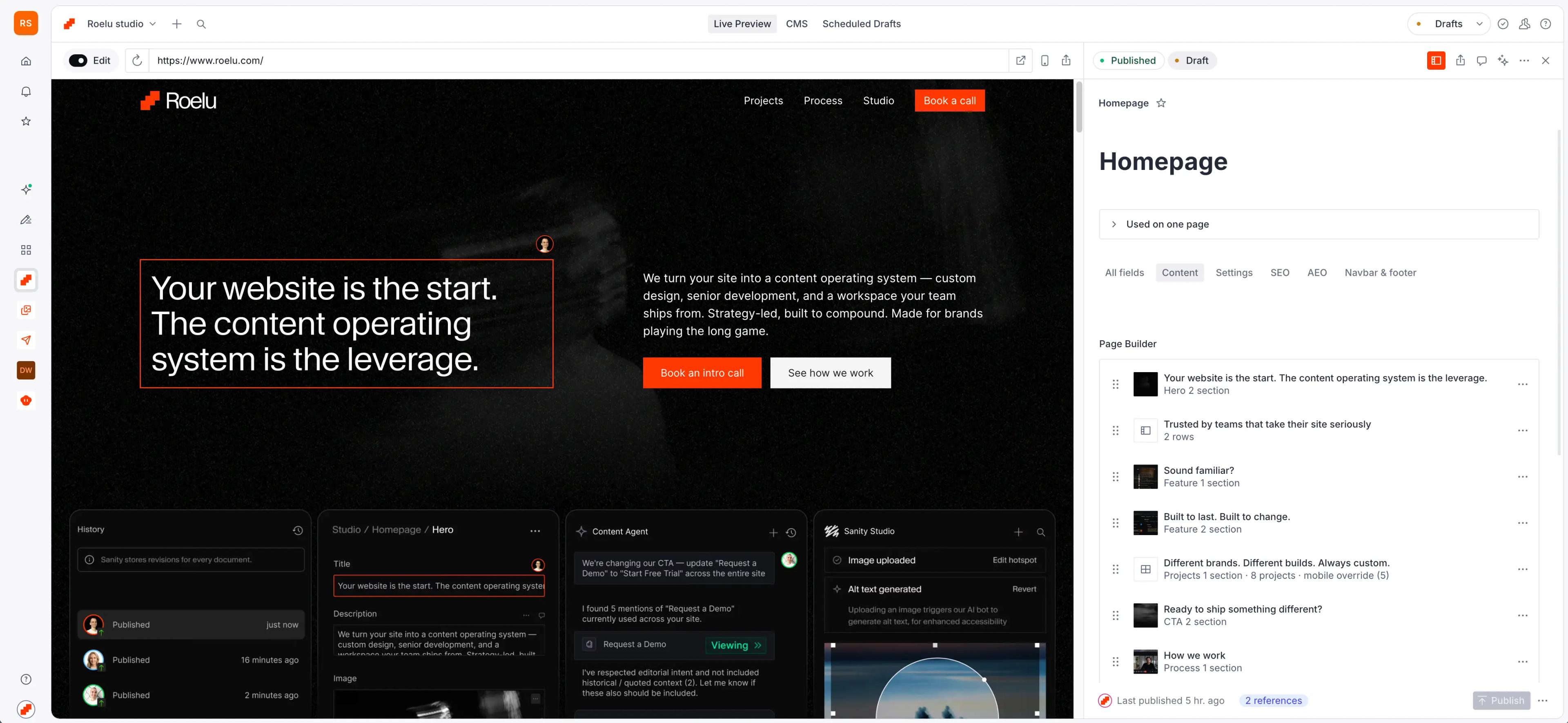
That's the whole point of the build. After launch you don't need us for content. A new campaign page on a Tuesday afternoon is your marketer's job, not a ticket. Our ongoing work is new features and real development, not headline swaps.
This is best for:
Businesses where the website works: a marketing team that publishes, campaigns that need landing pages, maybe multiple languages.
Not for you if you update your site twice a year, your budget is under $25K, or you need to be live in two weeks.
Whichever direction you pick, ask the three questions from the top. If the answer to "who can edit your site right now" is "nobody, we call someone," you already know what your current setup costs you.

See the difference live
We'll show you the editing experience on a real project. 30 minutes, no pitch deck.
Questions you probably have
Our projects start at $25K and go to $75K+ depending on scope: content volume, languages, and how much your team needs to build on their own.
Yes, from any platform. Your content moves into Sanity and the design is rebuilt from scratch around your brand.
No. That's the point. Your team runs content, pages, and campaigns from one dashboard. Developers come in only when you're building something new.